

Sandboxed File I/O
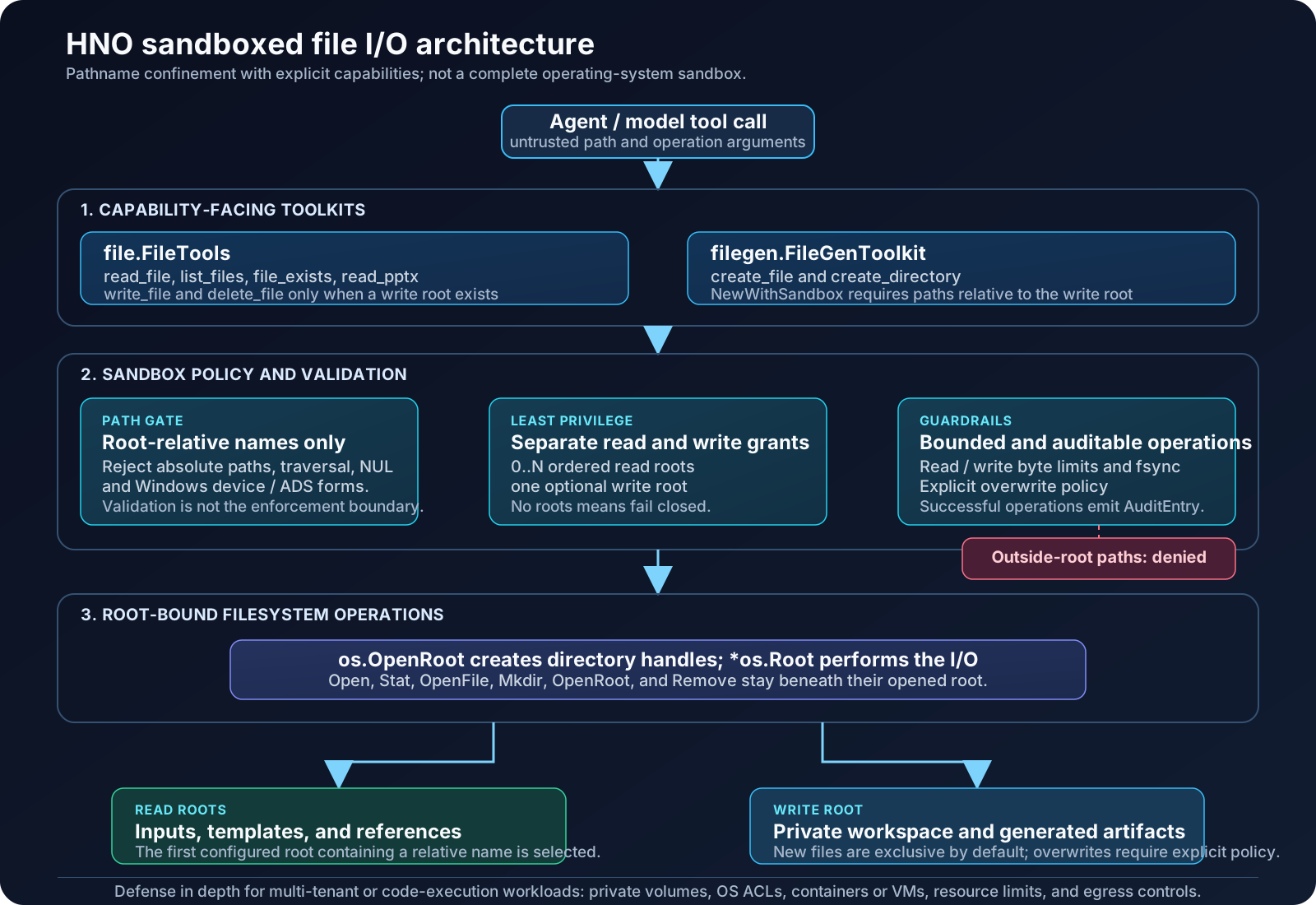
Giving an agent read_file or write_file is a capability grant, not a convenience feature. HNO's sandboxed file I/O limits that grant to explicit filesystem roots and binds the actual filesystem operation to those roots.
Scope of this feature
This is pathname confinement, not a complete operating-system sandbox. It prevents a file-tool call from resolving outside its configured roots, including through escaping symbolic links. It does not isolate a process, restrict network access, or neutralize mounts, existing hard links, device files, or other privileged resources already reachable inside a granted root.
Why a path allowlist is not enough
A check such as filepath.Abs, filepath.Rel, or a string-prefix comparison can reject obvious ../ input, but it is not a security boundary by itself:
- symbolic links can change where a checked pathname resolves;
- validating a name and then calling
os.ReadFileoros.WriteFileleaves a time-of-check/time-of-use gap; - absolute-path behavior and the process working directory can create different interpretations of the same caller input;
- Windows has additional drive-relative, UNC, device, and alternate-data-stream path forms.
HNO therefore validates the agent-facing name and uses Go's os.OpenRoot and *os.Root APIs for the real operation. The operating system receives a root-relative name attached to an opened directory handle rather than an unrestricted pathname.
Capability model
file.NewSandbox starts fail closed. A sandbox with no configured roots can be constructed, but every read or write operation is denied until a capability is explicitly granted.
| Capability | Configuration | What it grants |
|---|---|---|
| Read | file.WithReadRoots("./inputs", "./templates") | Read, list, metadata lookup, and PPTX extraction below one or more ordered roots. |
| Write | file.WithWriteRoot("./workspace") | Create, write, delete, and create directories below one root. It does not grant reads. |
| Read size | file.WithMaxReadBytes(n) | Maximum bytes returned by one normal file read. Default: 10 MiB. |
| Write size | file.WithMaxWriteBytes(n) | Maximum bytes accepted by one write. Default: 5 MiB. |
| Replace | file.WithAllowOverwrite(true) | Allows the file toolkit to replace an existing regular file. Disabled by default. |
| Audit | file.WithAudit(fn) | Receives an AuditEntry after a successful sandboxed operation. |
Read roots are deliberately separate from the write root. A reporting agent can read source material without receiving permission to modify it; a generation agent can write artifacts without automatically receiving permission to inspect other workspace files.
Configure an agent
Use NewWithSandbox for agents that receive paths from a model, a user, or any other untrusted source. Agent-facing paths are always relative to the configured root. Do not pass a host absolute path to a sandboxed toolkit.
sandbox, err := file.NewSandbox(
    file.WithReadRoots("./agent-inputs", "./shared-templates"),
    file.WithWriteRoot("./agent-workspace"),
    file.WithMaxReadBytes(10<<20),
    file.WithMaxWriteBytes(5<<20),
    file.WithAudit(func(entry file.AuditEntry) {
        log.Printf("sandbox op=%s path=%s size=%d at=%s",
            entry.Operation, entry.Path, entry.Size, entry.At.Format(time.RFC3339))
    }),
)
if err != nil {
    log.Fatal(err)
}
defer sandbox.Close() // Close after all agent/tool work has completed.

fileTools := file.NewWithSandbox(sandbox)
fileGenTools := filegen.NewWithSandbox(sandbox)

ag, err := agent.New(agent.Config{
    Model: model,
    Toolkits: []toolkit.Toolkit{
        fileTools,
        fileGenTools,
    },
})
if err != nil {
    log.Fatal(err)
}The callback should write to a concurrency-safe audit sink when tool calls can run concurrently. Audit entries contain the operation, root-relative path, size, and timestamp; they do not contain file content.
When multiple toolkits share one Sandbox, call sandbox.Close() once after all work finishes. Closing either toolkit closes the underlying sandbox and makes the other toolkit unusable.
What happens during a tool call
- The model asks for a tool operation such as
read_file,write_file,create_file, orcreate_directory. - The toolkit checks its sandbox configuration. A nil sandbox configuration fails closed rather than falling back to unrestricted host I/O.
- The sandbox normalizes and rejects unsafe agent-facing names: empty names, absolute paths,
..traversal, NUL bytes, and Windows-specific dangerous forms such as drive-relative paths, reserved device names, and alternate data streams. - The sandbox selects a read root or the single write root based on the requested capability.
- The operation runs through
*os.Root(Open,Stat,OpenFile,Mkdir,OpenRoot, orRemove). Symbolic links may be followed only when their resolution remains under that opened root. - Read and write limits are enforced, successful writes are synced, and a successful operation can emit an audit entry.
The validation step improves diagnostics and rejects malformed names early. The *os.Root operation is the enforcement boundary that prevents a validated name from later resolving outside the granted directory.
Writes also reject a final symbolic link when it is observed during the preflight check. That check is defense in depth, not a portable atomic no-follow primitive: a concurrent process that can modify an allowed write root can swap an in-root entry after the check. *os.Root still prevents that swap from escaping the root, but it cannot guarantee the identity of an in-root target. Use private per-run roots or higher-level locking when another process can alter the same workspace.
Toolkit behavior
file.FileTools
file.NewWithSandbox(sandbox) exposes these root-relative tool calls:
| Tool call | Required capability | Notes |
|---|---|---|
read_file(path) | Read | Reads regular files only and enforces the read limit. |
list_files(path) | Read | Lists one directory. Use "." for the root directory. |
file_exists(path) | Read | Returns metadata when the name can be resolved within a read root. |
read_pptx(path) | Read | Opens the sandboxed file handle before parsing the ZIP payload. |
write_file(path, content) | Write | Creates parent directories below the write root as needed. |
delete_file(path) | Write | Removes a file or empty directory below the write root. |
For write_file, a new target is created exclusively. Replacing an existing regular file is denied unless the sandbox was created with WithAllowOverwrite(true).
filegen.FileGenToolkit
filegen.NewWithSandbox(sandbox) reuses the same write-root capability for artifact generation:
| Tool call | Path argument | Existing target behavior |
|---|---|---|
create_file | file_path | Existing files require both overwrite: true in the tool call and WithAllowOverwrite(true) on the sandbox. |
create_directory | dir_path | Parent directories are created as needed; an existing target is an error. |
generate_from_template | none | Performs in-memory template substitution and does not access the filesystem. |
The two-part overwrite rule prevents a model from replacing a file merely because the host enabled overwrite in general, and prevents a caller's overwrite: true from bypassing a restrictive sandbox policy.
Path contract and examples
With file.WithWriteRoot("./agent-workspace"), these agent-facing arguments have the following meaning:
| Argument | Result |
|---|---|
"reports/summary.md" | Allowed; resolves beneath ./agent-workspace. |
"../secrets.txt" | Rejected as traversal. |
"/etc/passwd" or "C:\\Windows\\win.ini" | Rejected as an absolute or platform-specific path. |
"out/report.txt" where out is a symlink outside the root | Rejected by the root-bound operation. |
"." for a write or create target | Rejected because the root directory itself is not a file target. |
For multiple read roots, HNO checks them in configuration order and uses the first root that contains the requested relative name. This makes it possible to grant a read-only template directory alongside an input directory without exposing either as a writable location.
Compatibility and migration
| Constructor | Intended use |
|---|---|
file.New() | Unrestricted legacy behavior. Use only in trusted programs where callers never supply untrusted paths. |
file.NewWithBaseDir(baseDir) | Compatibility constructor that confines both reading and writing to one root while preserving legacy absolute in-root path behavior and overwrite behavior. |
file.NewWithSandbox(sandbox) | Recommended constructor for new agent-facing file tools. Paths are root-relative and capabilities are explicit. |
filegen.New() | Unrestricted legacy file generation for trusted programs only. |
filegen.NewWithSandbox(sandbox) | Recommended constructor for generated agent artifacts. |
A practical migration is to give each run or tenant a dedicated workspace volume, configure it as the write root, and make any shared inputs explicit read roots. Avoid making a repository checkout, home directory, or broad mounted volume a default write root.
Security boundary and deployment guidance
The sandbox protects which names a file toolkit may resolve. It does not make arbitrary code safe to execute. For multi-tenant, untrusted-code, or high-assurance workloads, layer additional controls around it:
- one private volume or directory tree per tenant/run;
- host filesystem ACLs and a low-privilege service account;
- container, VM, or sandbox-runtime isolation for executed processes;
- CPU, memory, process-count, and disk-quota limits;
- outbound-network allowlists or egress isolation;
- durable audit logging and retention appropriate to the data classification.
os.Root itself does not prevent filesystem-boundary traversal such as Linux bind mounts, nor does pathname confinement revoke access represented by special files or hard links that already exist inside a granted root. Treat the chosen root and the surrounding deployment as part of the security policy.
The security guarantees described here target native Go platforms. The Go standard library documents os.Root on GOOS=js as vulnerable to a symlink validation TOCTOU race, so it must not be used as a security boundary there.
Verification coverage
The regression suite covers fail-closed configuration, separated read/write roots, traversal and absolute-path rejection, symbolic-link escape attempts, detected final symbolic links, size limits, parent creation, overwrite policy, audit events, Windows special paths, and sandboxed filegen creation flows.
Run the focused suite with:
go test ./pkg/hno/tools/file/... ./pkg/hno/tools/filegen/... -v
go vet ./pkg/hno/tools/file/... ./pkg/hno/tools/filegen/...See the Tools guide, Tools API reference, and the engineering note on root-bound file sandboxes for more context.